

Lesson 8 of 10 · ~6 minutes · Prerequisite: Lesson 7 — Quotes and invoicing
What you’ll learn
- How Arya’s automation engine works
- How to build a visual workflow
- How to test it and monitor its runs
How it works
A workflow is a sequence of actions that starts when a trigger fires. Shape:Available triggers
Record created / updated / deleted
Record created / updated / deleted
Whenever a record is created, modified or deleted. Filters per field.
Status changed
Status changed
When a record changes status (e.g. deal → Won, invoice → Paid).
Scheduled (cron)
Scheduled (cron)
On a schedule: hourly, daily at 9am, every Monday, etc.
Incoming webhook
Incoming webhook
Public URL you receive from external systems (Zapier, Make, custom APIs).
Form submitted
Form submitted
An Arya public form is submitted.
Email received
Email received
An email arrives at a monitored address.
Manual
Manual
The workflow runs only when triggered manually from a record or list.
Available actions
30+ actions grouped as: record (create, update, delete, duplicate), communication (email, SMS, Slack, WhatsApp, Telegram), integrations (DocuSign, FatturaInCloud, Google Calendar), flow (condition, branch, wait, loop), data (transform, compute, outgoing webhook).Build your first workflow
Example: “When I close a deal as won, create a project and notify #sales on Slack”.1
Open Automations
Click Automations in the sidebar → + New workflow.
2
Pick the trigger
Select Status changed on the 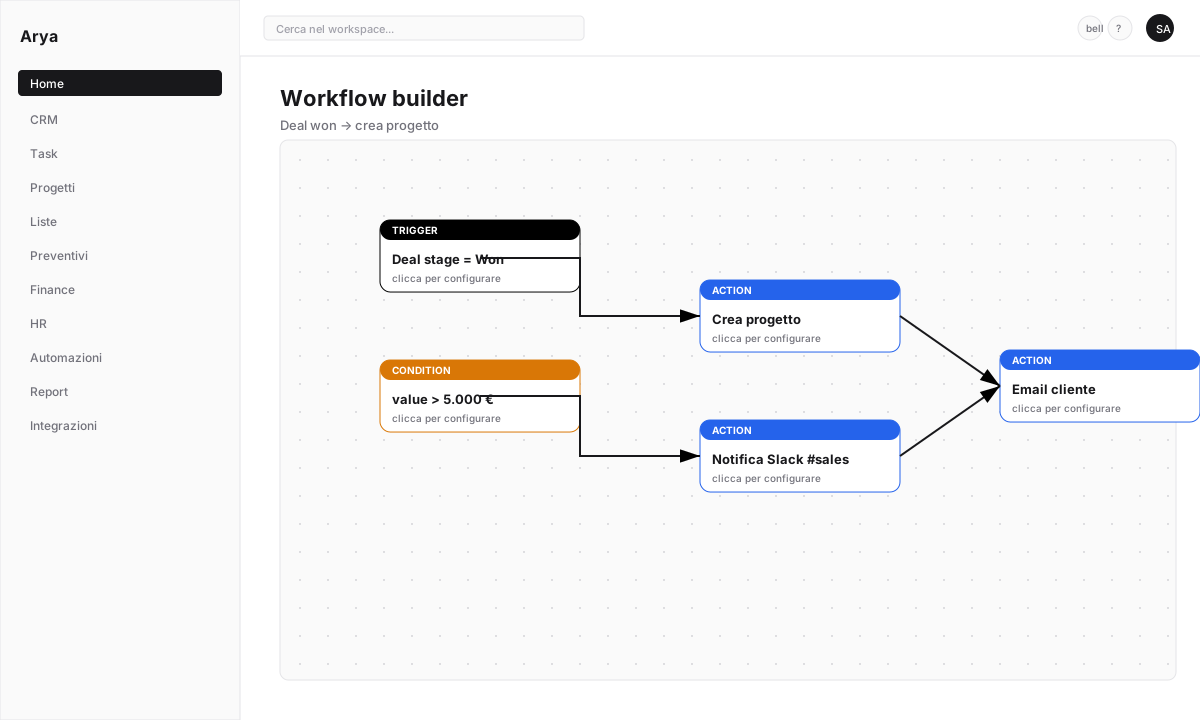
Deal object.- Object:
Deal - Field:
Stage - From: any
- To:
Won
3
Add 'Create project' action
Click + Action → select Create record → object
Project.Map fields:- Project name:
{{trigger.deal.name}} - Customer:
{{trigger.deal.company}} - Budget:
{{trigger.deal.value}} - Start date:
{{now}}
4
Add 'Slack notification' action
Click + Action → Send Slack message → channel
#sales.Message:Slack requires an active integration — see Slack integration.
5
Add 'Email customer' action
Click + Action → Send email → to
{{trigger.deal.primary_contact.email}}.Use a saved template or write inline. Attachments: you can include the accepted quote.6
Save and activate
Click Save → toggle Active. The workflow starts firing on the next matching events.
Test before production
1
Test mode
Before activating, click Run in test → pick a sample record. Arya simulates all actions showing inputs and outputs without real side effects.
2
Dry run in production
Activating with the Dry run flag logs actions without executing them. Useful for validating on real data.
Monitoring and debugging
The Run history section shows every execution:- Date/time
- Trigger record
- Status:
Success,Error,Cancelled - Duration
- Detailed log per action

Exposed webhooks
To trigger a workflow from an external system, Arya generates a unique webhook URL. Paste it into Zapier/Make/custom systems — each POST call starts the workflow with the received payload.Verify
You created a workflow with at least one trigger and one action
You tested in test mode before activating
You know where to check run history
Next lesson
Lesson 9 — Reports and dashboards
Visualise data with custom dashboards and charts.