

Lesson 10 of 10 · ~4 minutes · Prerequisite: Lesson 9 — Reports and dashboards
What you’ll learn
- Where and how to activate Arya’s AI
- How AI credits work
- Best practices for effective prompts
Where you meet AI in Arya
AI is embedded in strategic spots across the platform:AryaChat
Conversational chat with full workspace context. Available from the sidebar or with
⌘+K.Contextual sidebar
On every record (deal, company, task) Arya suggests next steps based on the data.
Report Chat
Ask dashboards questions in natural language.
Document generation
Create emails, proposals, summaries from the record context.
Call intelligence
Automatic transcription, summaries, action items extracted from calls.
Data enrichment
Select a group of companies and ask Arya to fill missing fields.
AryaChat in practice
1
Open the chat
Click the chat icon top-right or press 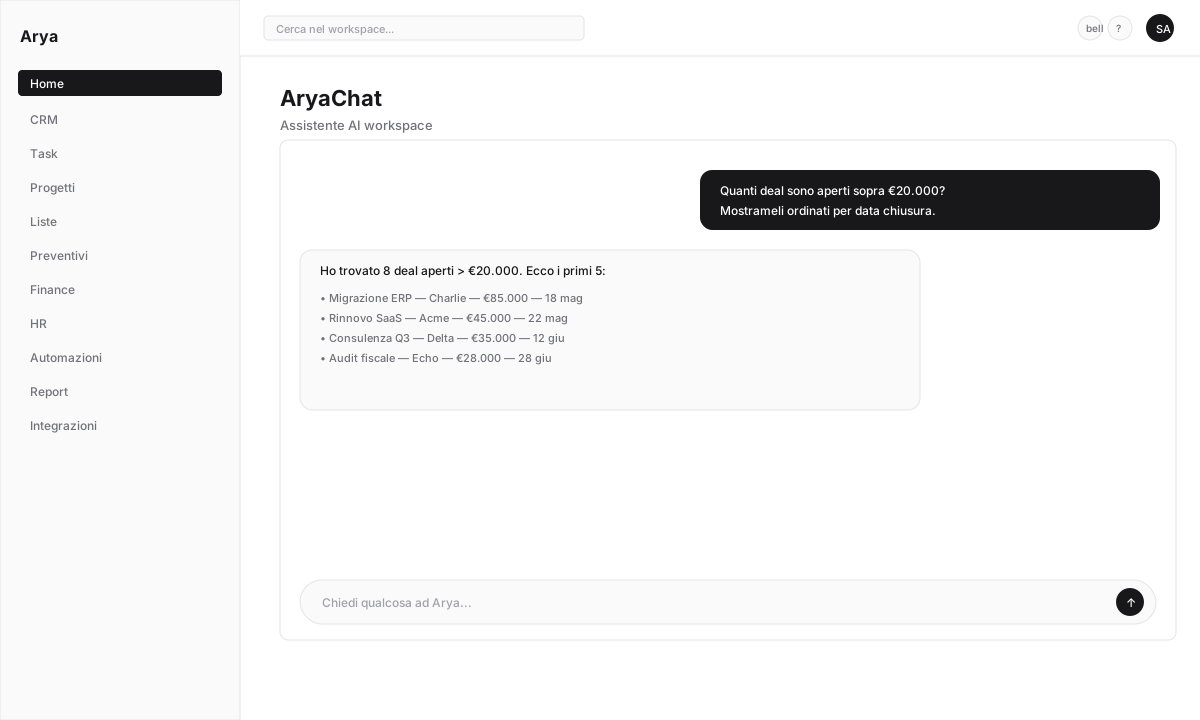
⌘+K (Mac) / Ctrl+K (Windows).2
Ask a question
Write in English or Italian. Examples:
- “Show me the 5 largest open deals” → Arya replies with a clickable table
- “Create a task to call Mario Rossi tomorrow” → Arya creates the task (asks for confirmation)
- “Summarise the last month of activity on Acme Corp” → structured answer with key events
- “Write a professional follow-up email on this quote” → ready-to-send draft
3
Confirm actions
For actions that modify data (create records, send emails) Arya always asks for confirmation. You can also undo right after.
4
Voice input
Click the microphone icon → speak. Arya transcribes and replies. Useful on mobile.
AI credits
AI use consumes credits. Every plan includes a monthly quota; beyond that you can:- Wait for next month’s reset
- Buy additional credits
- Use your own OpenAI/Anthropic API key (BYOK)
Approximate consumption
Monitor usage
In Settings → Arya AI you see:- Available credits
- Usage history per user and type
- Detailed call logs (Agent logs)

Earn credits
For every referred workspace that becomes paying, you receive €10 in AI credits (non-expiring). See Referral program.Bring your own key
If you prefer to use OpenAI or Anthropic directly:1
Get an API key
Generate a key at platform.openai.com or console.anthropic.com.
2
Paste into Arya
Settings → Arya AI → Provider → select
OpenAI (BYOK) or Anthropic (BYOK) → paste the key.3
Pick the model
Select which model to use (e.g.
gpt-4.1, claude-sonnet-4-6). Params: temperature, reasoning verbosity.Prompt best practices
Be specific about context
Be specific about context
❌ “Write a follow-up email”
✅ “Write a follow-up email to Mario Rossi at Acme Corp about the quote sent yesterday, professional but casual tone, short length, in Italian”
Use record references
Use record references
When you’re on a deal page, Arya already has the deal context. Just say: “Draft me a script for the next call” — no need to repeat the data.
Iterate
Iterate
If the first reply isn’t perfect: “Shorter”, “Add a reference to expected ROI”, “Change to a more formal tone”.
Leverage threads
Leverage threads
AryaChat keeps thread memory. Keep working on the same context instead of opening new chats for every question.
Verify
You tried AryaChat with at least three different questions
You know where to check credit balance and usage history
You know how to connect your own API key if you prefer BYOK
You finished Arya 101!
Congratulations. You now know the fundamentals of Arya Nest.Module deep dives
Detailed guides for every platform section.
Mobile app
How to use Arya on iOS and Android.
Advanced automations
Webhooks, branching, loops, complex integrations.
Reference
Glossary, keyboard shortcuts, FAQs.