

Lesson 5 of 10 · ~6 minutes · Prerequisite: Lesson 4 — Lists and views
What you’ll learn
- How Arya’s sales pipeline is structured
- How to create a deal and move it between stages
- How to link contacts, emails, calls and quotes to a deal
The Kanban pipeline
Arya’s CRM opens by default on a Kanban view: one column per pipeline stage. Drag deals between columns to update status.
- Prospect — newly created opportunity
- Qualified — verified lead
- Proposal — quote sent
- Negotiation — active negotiation
- Won
- Lost
Create your first deal
1
Open CRM
Click CRM in the sidebar → Deals tab.
2
New deal
Click + New deal in the top right. Fill in: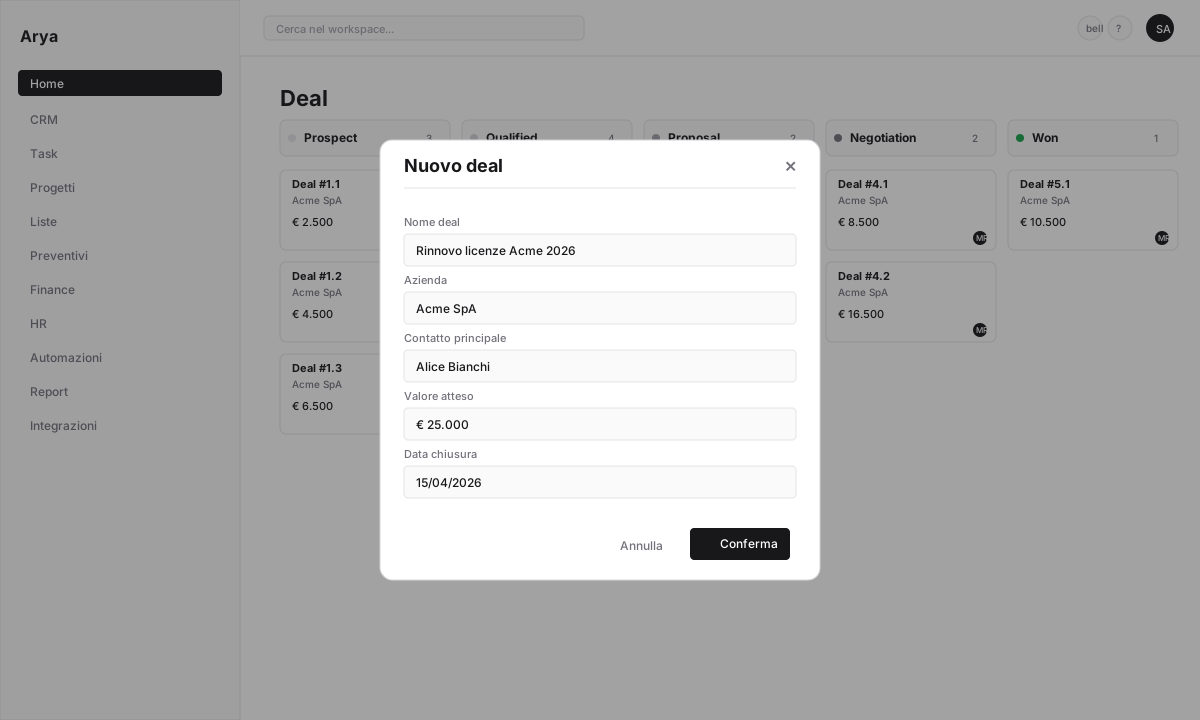
- Deal name: descriptive (e.g.
Acme licence renewal 2026) - Company: Arya searches the database or lets you create one
- Primary contact
- Value: expected amount
- Estimated close date
- Owner
3
Move in the pipeline
Drag the card from one column to another. Every stage change is recorded in the history.
4
Open the detail
Click a card to open the deal detail with all tabs: Overview, Activity, Notes, Tasks, Contacts, Quotes, Documents.
Link activity to the deal
From the deal detail you can:Add contacts
A deal can have multiple contacts (buyer, technical decision-maker, procurement).
Log calls
Calls are transcribed and summarised by AI — see Call intelligence.
Sync email
With Gmail connected, all emails to/from contacts appear in the timeline.
Generate quotes
From scratch or template, with public link and digital signing.
Create tasks
Follow-ups, demo prep, material sending.
Take notes
Rich text, @mentions, checklists.
Close the deal
1
Move to Won or Lost
Drag the card to the final stage. Arya asks for a close reason.
2
Check the margin
If the deal has quotes or products with costs attached, Arya computes the margin and shows it in the pipeline report.
3
Trigger automations
Moving to
Won can automatically: create a project, notify Slack, send a confirmation email. See Lesson 8 — Automations.Bulk import
If you have existing deals or contacts in Excel/CSV, import them:- CRM → Deals → ⋯ menu → Import
- Upload the file, map columns to fields
- Preview before import, rollback on error
Verify
You created a deal with linked company and contact
You moved the deal across at least two stages
You added a task or note to the deal
Next lesson
Lesson 6 — Tasks and projects
Organise work with tasks and projects, linked to the CRM.