> ## Documentation Index
> Fetch the complete documentation index at: https://docs.arya.so/llms.txt
> Use this file to discover all available pages before exploring further.
# Deals
> Create, manage and close sales opportunities with customisable pipelines.
A **deal** is a single sales opportunity. It has a customer, an expected value, a pipeline stage, an owner and a full activity history.
 ## Create a deal
Click **CRM → Deals** in the sidebar, then **+ New deal** top right.
## Create a deal
Click **CRM → Deals** in the sidebar, then **+ New deal** top right.
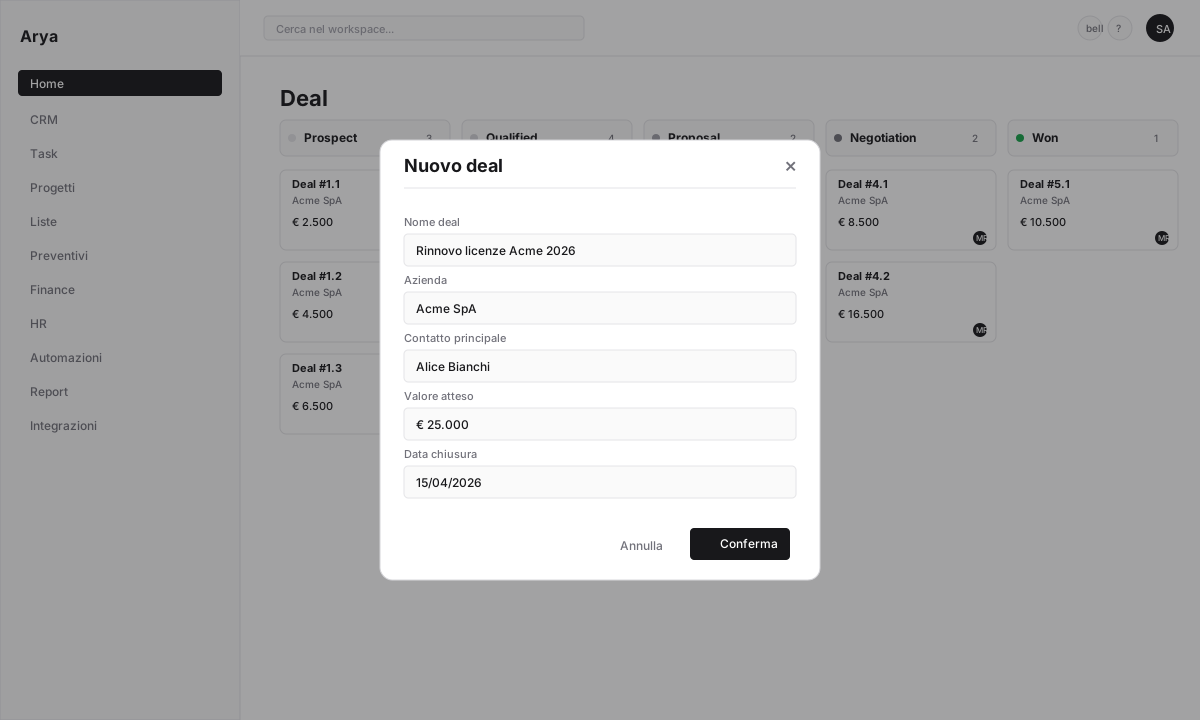 * **Deal name**: descriptive and unique (e.g. `Acme SaaS renewal 2026`)
* **Company**: search or create on the fly
* **Owner**: who owns the deal
* **Expected value**: amount in workspace currency
* **Probability** (%): estimate of closing
* **Estimated close date**
* **Lead source**: inbound, outbound, referral, event, partner
Add one or more contacts (buyer, technical decision-maker, procurement). Mark who is the **primary contact** — Arya uses them as default recipient for emails and quotes.
The deal appears in the pipeline at stage `Prospect` (or the first stage of the selected pipeline).
## Main fields
| Field | Type | Notes |
| --------------- | ----------------- | ------------------------ |
| Name | Text | Required |
| Company | Reference | Required |
| Primary contact | Reference | Optional |
| Owner | Reference to user | Default: creator |
| Value | Currency | Multi-currency supported |
| Probability | % | Feeds weighted forecast |
| Stage | Status | Defined by the pipeline |
| Close date | Date | Used in forecast |
| Source | Select | Customisable |
| Tags | Multi-select | For segmentation |
You can add custom fields (industry, competitor, customer budget, etc.) in **Settings → Objects → Deal**. See [Attributes](/en/arya-101/lesson-3-attributes).
## Common actions
**Drag-and-drop**: drag the Kanban card between columns.
**Keyboard**: select the deal (arrow keys), press `m` to change stage.
**From detail**: click the current stage in the header → pick a new stage.
Every change is logged with user, date and duration in the previous stage.
From the deals table, select multiple rows with checkboxes, click **Actions → Edit**. Change stage, owner, tags, dates in batch.
If a customer has two identical deals, open them, click **⋯ → Merge with another deal**. Arya keeps the older deal and moves activity, notes and contacts from the other.
For deals no longer active that you don't want to mark `Lost`, click **⋯ → Archive**. Hidden from views, kept in history.
From the table view click **Actions → Export** → Excel or CSV. Export respects active filters.
**⋯ → Import from CSV/Excel**. Arya helps you map columns to fields. Preview before commit, rollback on error.
## Activity and history
Every deal has a **timeline** that logs automatically:
* Stage changes with date and duration
* Sent/received emails (with Gmail connected)
* Recorded calls (with [Call Intelligence](/en/crm/calls-and-call-intelligence))
* Created/completed tasks
* Generated quotes
* Team notes and comments
Filter the timeline by event type in the dropdown.
## Related automations
When a deal moves to `Negotiation`, notify the sales manager.
Create a "call back within 3 days" task if a deal stays 7+ days in the same stage.
Won → automatic project creation with budget from the quote.
Celebrate wins: auto message to #sales when the deal moves to `Won`.
## Frequently asked questions
Yes. Configure multiple pipelines in **Settings → Pipeline** (e.g. retail, enterprise, partnerships). Each deal belongs to one pipeline.
Forecast = Sum of `value × probability` for all open deals in the period. See [Sales reports](/en/reports/dashboards).
Yes. Set the deal as private or limit to a specific team from **⋯ → Permissions**. Admins always see everything.
Stays in the workspace with `Lost` stage and loss reason. You can reopen it anytime by moving it to an open stage.
**On mobile** — you can create, edit and move deals across the pipeline from iPhone/Android too. See [CRM on mobile](/en/mobile/overview).
* **Deal name**: descriptive and unique (e.g. `Acme SaaS renewal 2026`)
* **Company**: search or create on the fly
* **Owner**: who owns the deal
* **Expected value**: amount in workspace currency
* **Probability** (%): estimate of closing
* **Estimated close date**
* **Lead source**: inbound, outbound, referral, event, partner
Add one or more contacts (buyer, technical decision-maker, procurement). Mark who is the **primary contact** — Arya uses them as default recipient for emails and quotes.
The deal appears in the pipeline at stage `Prospect` (or the first stage of the selected pipeline).
## Main fields
| Field | Type | Notes |
| --------------- | ----------------- | ------------------------ |
| Name | Text | Required |
| Company | Reference | Required |
| Primary contact | Reference | Optional |
| Owner | Reference to user | Default: creator |
| Value | Currency | Multi-currency supported |
| Probability | % | Feeds weighted forecast |
| Stage | Status | Defined by the pipeline |
| Close date | Date | Used in forecast |
| Source | Select | Customisable |
| Tags | Multi-select | For segmentation |
You can add custom fields (industry, competitor, customer budget, etc.) in **Settings → Objects → Deal**. See [Attributes](/en/arya-101/lesson-3-attributes).
## Common actions
**Drag-and-drop**: drag the Kanban card between columns.
**Keyboard**: select the deal (arrow keys), press `m` to change stage.
**From detail**: click the current stage in the header → pick a new stage.
Every change is logged with user, date and duration in the previous stage.
From the deals table, select multiple rows with checkboxes, click **Actions → Edit**. Change stage, owner, tags, dates in batch.
If a customer has two identical deals, open them, click **⋯ → Merge with another deal**. Arya keeps the older deal and moves activity, notes and contacts from the other.
For deals no longer active that you don't want to mark `Lost`, click **⋯ → Archive**. Hidden from views, kept in history.
From the table view click **Actions → Export** → Excel or CSV. Export respects active filters.
**⋯ → Import from CSV/Excel**. Arya helps you map columns to fields. Preview before commit, rollback on error.
## Activity and history
Every deal has a **timeline** that logs automatically:
* Stage changes with date and duration
* Sent/received emails (with Gmail connected)
* Recorded calls (with [Call Intelligence](/en/crm/calls-and-call-intelligence))
* Created/completed tasks
* Generated quotes
* Team notes and comments
Filter the timeline by event type in the dropdown.
## Related automations
When a deal moves to `Negotiation`, notify the sales manager.
Create a "call back within 3 days" task if a deal stays 7+ days in the same stage.
Won → automatic project creation with budget from the quote.
Celebrate wins: auto message to #sales when the deal moves to `Won`.
## Frequently asked questions
Yes. Configure multiple pipelines in **Settings → Pipeline** (e.g. retail, enterprise, partnerships). Each deal belongs to one pipeline.
Forecast = Sum of `value × probability` for all open deals in the period. See [Sales reports](/en/reports/dashboards).
Yes. Set the deal as private or limit to a specific team from **⋯ → Permissions**. Admins always see everything.
Stays in the workspace with `Lost` stage and loss reason. You can reopen it anytime by moving it to an open stage.
**On mobile** — you can create, edit and move deals across the pipeline from iPhone/Android too. See [CRM on mobile](/en/mobile/overview).