> ## Documentation Index
> Fetch the complete documentation index at: https://docs.arya.so/llms.txt
> Use this file to discover all available pages before exploring further.
# Lesson 2 — Objects and records
> Learn how Arya models your data: deals, companies, contacts, projects.
**Lesson 2 of 10** · \~5 minutes · Prerequisite: [Lesson 1 — Workspace](/en/arya-101/lesson-1-workspace)
## What you'll learn
* The difference between **object** and **record**
* What objects ship out of the box in Arya
* When to create a custom object
## Object vs record
An **object** is a type of entity — like a table in a database. A **record** is a single instance of that object — like a row of that table.
Example: the `Deal` object represents the concept "sales opportunity". The record `Acme Corp 2026 contract renewal` is a specific deal you're working.
 ## Standard objects
Arya includes these objects out of the box:
| Object | Represents | Module |
| ----------------- | --------------------------- | -------- |
| Deal | Sales opportunity | CRM |
| Company | Customer / supplier company | CRM |
| Contact | Individual person | CRM |
| Task | To-do | Tasks |
| Project | Engagement / project | Projects |
| Quote | Quote / offer | Quotes |
| Invoice | Invoice | Finance |
| Employee | Staff member | HR |
| Product / Service | Price list item | Products |
Each has standard attributes and features (views, filters, AI, automations).
## Create your first record
Click **CRM → Companies** in the sidebar.
Click **+ New company**. Enter name, website, VAT number. Arya auto-enriches with public data (industry, size, city).
## Standard objects
Arya includes these objects out of the box:
| Object | Represents | Module |
| ----------------- | --------------------------- | -------- |
| Deal | Sales opportunity | CRM |
| Company | Customer / supplier company | CRM |
| Contact | Individual person | CRM |
| Task | To-do | Tasks |
| Project | Engagement / project | Projects |
| Quote | Quote / offer | Quotes |
| Invoice | Invoice | Finance |
| Employee | Staff member | HR |
| Product / Service | Price list item | Products |
Each has standard attributes and features (views, filters, AI, automations).
## Create your first record
Click **CRM → Companies** in the sidebar.
Click **+ New company**. Enter name, website, VAT number. Arya auto-enriches with public data (industry, size, city).
 From the company page click **+ New contact** in the Contacts section. Name, email, role. The contact is automatically linked to the company.
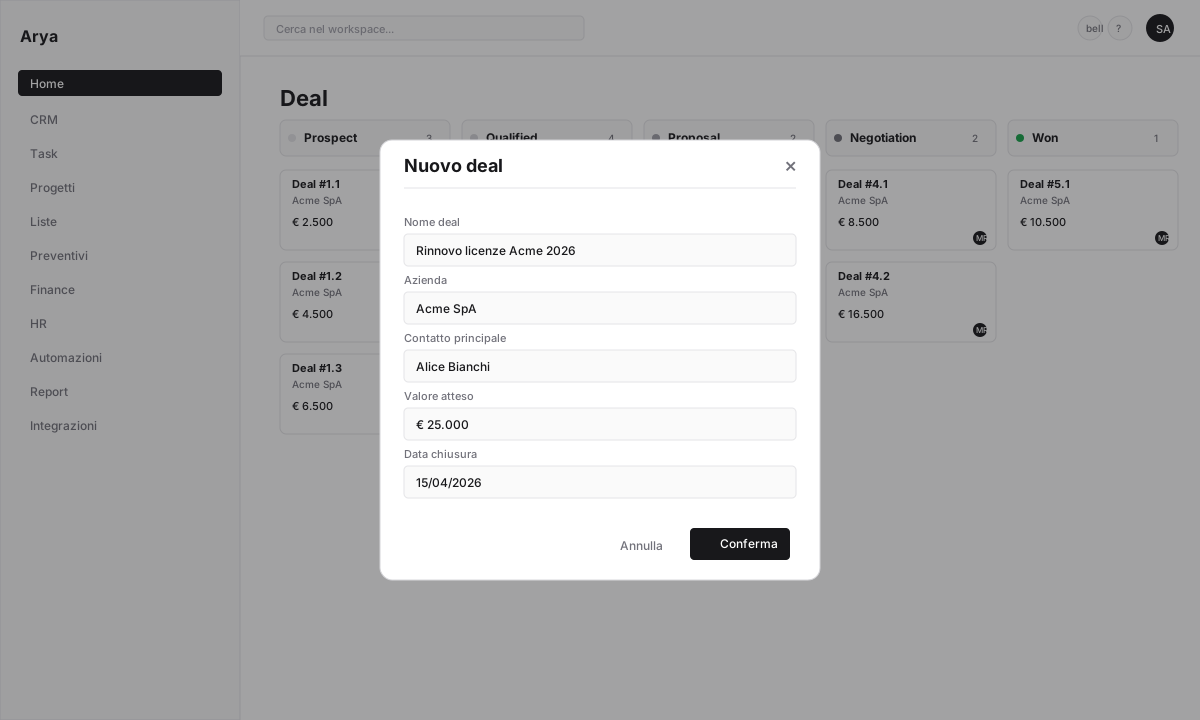
From the contact, click **+ New deal**. Arya prefills the company and primary contact. Set expected value and close date.
## Relationships between records
Your data is not isolated. When you open the deal you just created you see:
* The linked **company**
* The associated **contacts**
* All **emails**, **calls**, **tasks**, **quotes** you'll add
* The automatic **activity timeline**
Relationships are bidirectional: from the company you see all its deals, contacts, invoices, projects.
## Custom objects
If your business has entities not covered by standard objects (e.g. `Supplier`, `Policy`, `Machine`, `Legal case`), create **custom objects** in **Settings → Custom objects**. They get the same features as standard objects.
Don't create a custom object on a whim if a standard object fits. A `Supplier` is often just a `Company` with a `Type` field set to `Supplier`.
## Verify
You can distinguish an object from a record
You created a company, contact and deal linked to each other
You know where to create custom objects
## Next lesson
Add the fields your business needs, on any object.
From the company page click **+ New contact** in the Contacts section. Name, email, role. The contact is automatically linked to the company.
From the contact, click **+ New deal**. Arya prefills the company and primary contact. Set expected value and close date.
## Relationships between records
Your data is not isolated. When you open the deal you just created you see:
* The linked **company**
* The associated **contacts**
* All **emails**, **calls**, **tasks**, **quotes** you'll add
* The automatic **activity timeline**
Relationships are bidirectional: from the company you see all its deals, contacts, invoices, projects.
## Custom objects
If your business has entities not covered by standard objects (e.g. `Supplier`, `Policy`, `Machine`, `Legal case`), create **custom objects** in **Settings → Custom objects**. They get the same features as standard objects.
Don't create a custom object on a whim if a standard object fits. A `Supplier` is often just a `Company` with a `Type` field set to `Supplier`.
## Verify
You can distinguish an object from a record
You created a company, contact and deal linked to each other
You know where to create custom objects
## Next lesson
Add the fields your business needs, on any object.