> ## Documentation Index
> Fetch the complete documentation index at: https://docs.arya.so/llms.txt
> Use this file to discover all available pages before exploring further.
# Lesson 10 — AryaChat and AI credits
> How credits work, where to activate Arya, prompt best practices.
**Lesson 10 of 10** · \~4 minutes · Prerequisite: [Lesson 9 — Reports and dashboards](/en/arya-101/lesson-9-reports-and-dashboards)
## What you'll learn
* Where and how to activate Arya's AI
* How AI credits work
* Best practices for effective prompts
## Where you meet AI in Arya
AI is embedded in strategic spots across the platform:
Conversational chat with full workspace context. Available from the sidebar or with `⌘+K`.
On every record (deal, company, task) Arya suggests next steps based on the data.
Ask dashboards questions in natural language.
Create emails, proposals, summaries from the record context.
Automatic transcription, summaries, action items extracted from calls.
Select a group of companies and ask Arya to fill missing fields.
## AryaChat in practice
Click the chat icon top-right or press `⌘+K` (Mac) / `Ctrl+K` (Windows).
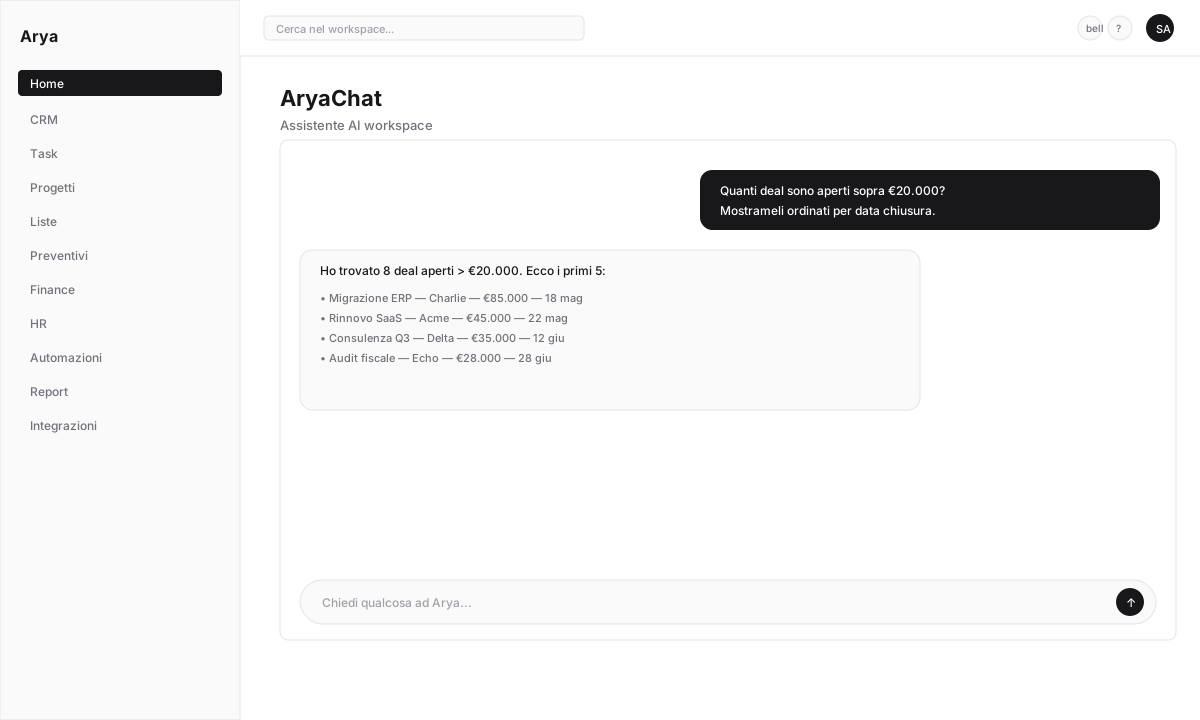 Write in English or Italian. Examples:
* *"Show me the 5 largest open deals"* → Arya replies with a clickable table
* *"Create a task to call Mario Rossi tomorrow"* → Arya creates the task (asks for confirmation)
* *"Summarise the last month of activity on Acme Corp"* → structured answer with key events
* *"Write a professional follow-up email on this quote"* → ready-to-send draft
For actions that modify data (create records, send emails) Arya always asks for confirmation. You can also undo right after.
Click the microphone icon → speak. Arya transcribes and replies. Useful on mobile.
## AI credits
AI use consumes **credits**. Every plan includes a monthly quota; beyond that you can:
* Wait for next month's reset
* Buy additional credits
* Use your own OpenAI/Anthropic API key (BYOK)
### Approximate consumption
| Action | Cost |
| ----------------------------- | -------------- |
| Simple chat question | 1-3 credits |
| Report Chat with analysis | 5-15 credits |
| Email/document generation | 10-30 credits |
| Call transcription (60 min) | 50-100 credits |
| Call summary | 10-20 credits |
| Company enrichment (with web) | 5-10 credits |
### Monitor usage
In **Settings → Arya AI** you see:
* Available credits
* Usage history per user and type
* Detailed call logs (Agent logs)
Write in English or Italian. Examples:
* *"Show me the 5 largest open deals"* → Arya replies with a clickable table
* *"Create a task to call Mario Rossi tomorrow"* → Arya creates the task (asks for confirmation)
* *"Summarise the last month of activity on Acme Corp"* → structured answer with key events
* *"Write a professional follow-up email on this quote"* → ready-to-send draft
For actions that modify data (create records, send emails) Arya always asks for confirmation. You can also undo right after.
Click the microphone icon → speak. Arya transcribes and replies. Useful on mobile.
## AI credits
AI use consumes **credits**. Every plan includes a monthly quota; beyond that you can:
* Wait for next month's reset
* Buy additional credits
* Use your own OpenAI/Anthropic API key (BYOK)
### Approximate consumption
| Action | Cost |
| ----------------------------- | -------------- |
| Simple chat question | 1-3 credits |
| Report Chat with analysis | 5-15 credits |
| Email/document generation | 10-30 credits |
| Call transcription (60 min) | 50-100 credits |
| Call summary | 10-20 credits |
| Company enrichment (with web) | 5-10 credits |
### Monitor usage
In **Settings → Arya AI** you see:
* Available credits
* Usage history per user and type
* Detailed call logs (Agent logs)
 ### Earn credits
For every referred workspace that becomes paying, you receive **€10 in AI credits** (non-expiring). See [Referral program](/en/cross-features/referral-program).
## Bring your own key
If you prefer to use OpenAI or Anthropic directly:
Generate a key at [platform.openai.com](https://platform.openai.com) or [console.anthropic.com](https://console.anthropic.com).
**Settings → Arya AI → Provider** → select `OpenAI (BYOK)` or `Anthropic (BYOK)` → paste the key.
Select which model to use (e.g. `gpt-4.1`, `claude-sonnet-4-6`). Params: temperature, reasoning verbosity.
From that point Arya uses your provider: no Arya credits consumed, you pay the provider directly.
## Prompt best practices
❌ *"Write a follow-up email"*
✅ *"Write a follow-up email to Mario Rossi at Acme Corp about the quote sent yesterday, professional but casual tone, short length, in Italian"*
When you're on a deal page, Arya already has the deal context. Just say: *"Draft me a script for the next call"* — no need to repeat the data.
If the first reply isn't perfect: *"Shorter"*, *"Add a reference to expected ROI"*, *"Change to a more formal tone"*.
AryaChat keeps thread memory. Keep working on the same context instead of opening new chats for every question.
## Verify
You tried AryaChat with at least three different questions
You know where to check credit balance and usage history
You know how to connect your own API key if you prefer BYOK
## You finished Arya 101!
Congratulations. You now know the fundamentals of Arya Nest.
Detailed guides for every platform section.
How to use Arya on iOS and Android.
Webhooks, branching, loops, complex integrations.
Glossary, keyboard shortcuts, FAQs.
### Earn credits
For every referred workspace that becomes paying, you receive **€10 in AI credits** (non-expiring). See [Referral program](/en/cross-features/referral-program).
## Bring your own key
If you prefer to use OpenAI or Anthropic directly:
Generate a key at [platform.openai.com](https://platform.openai.com) or [console.anthropic.com](https://console.anthropic.com).
**Settings → Arya AI → Provider** → select `OpenAI (BYOK)` or `Anthropic (BYOK)` → paste the key.
Select which model to use (e.g. `gpt-4.1`, `claude-sonnet-4-6`). Params: temperature, reasoning verbosity.
From that point Arya uses your provider: no Arya credits consumed, you pay the provider directly.
## Prompt best practices
❌ *"Write a follow-up email"*
✅ *"Write a follow-up email to Mario Rossi at Acme Corp about the quote sent yesterday, professional but casual tone, short length, in Italian"*
When you're on a deal page, Arya already has the deal context. Just say: *"Draft me a script for the next call"* — no need to repeat the data.
If the first reply isn't perfect: *"Shorter"*, *"Add a reference to expected ROI"*, *"Change to a more formal tone"*.
AryaChat keeps thread memory. Keep working on the same context instead of opening new chats for every question.
## Verify
You tried AryaChat with at least three different questions
You know where to check credit balance and usage history
You know how to connect your own API key if you prefer BYOK
## You finished Arya 101!
Congratulations. You now know the fundamentals of Arya Nest.
Detailed guides for every platform section.
How to use Arya on iOS and Android.
Webhooks, branching, loops, complex integrations.
Glossary, keyboard shortcuts, FAQs.